Demo: Event Bubble Pop / イベントカメラでバブル割りゲーム
- Source / ソースコード: EventSensorCourse/event_bubble_pop
- Hardware / ハードウェア: OpenMV H7 Plus + GENX320 event camera / イベントカメラ
- Course / 講義: Part of the Event Sensor Course (University of Aizu).
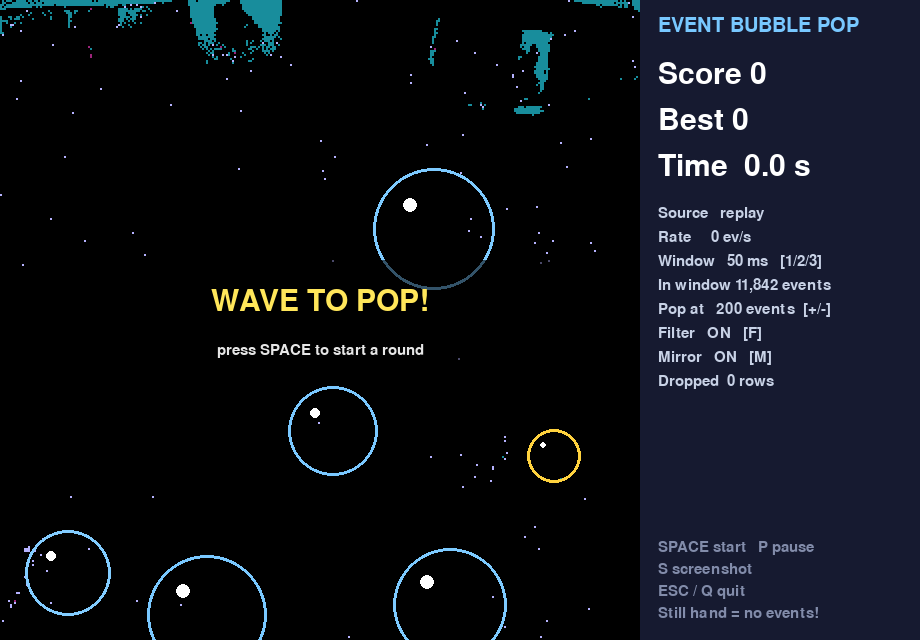
Bubbles float up over the live event view, and you pop them by waving your hand through them. If any bubble reaches the top, the game is over. A hand held still pops nothing: an event camera reports only changes in brightness, not images.
ライブのイベント映像の上をバブルが浮かび上がります。手を振ってバブルを割りましょう。バブルが一つでも上端に届くとゲームオーバーです。イベントカメラは明るさの変化だけを捉えるため、手を止めているとバブルは割れません。
How It Works / 仕組み
GENX320 → H7 Plus → USB batches → TimeWindows → denoise → pop bubbles → screen
- Denoise / ノイズ除去: isolated events are removed; real edges are connected, sensor noise is scattered.
- Light-change check / 照明変化の検出: if too many pixels fire at once, it is not a hand, and nothing pops.
- Pop / バブル割り: events inside each bubble are counted; when the count reaches the threshold, the bubble pops.
Windows use sensor timestamps (10 / 50 / 100 ms). The raw EVT2.0 stream format carries about 2.5× more events over USB than the processed format (~174k vs ~69k events/s), keeping the display close to real time.
Keys / 操作
| Key | Action |
|---|---|
| SPACE | Start a round / ゲーム開始 |
| 1 / 2 / 3 | Time window 10 / 50 / 100 ms |
| F | Noise filter on/off / ノイズフィルタ |
| M | Mirror view / ミラー表示 |
| + / − | Pop threshold / 割れるしきい値 |
| P | Pause / 一時停止 |
| ESC / Q | Quit / 終了 |
Run the Demo / デモの実行
git clone https://github.com/EventSensorCourse/event_bubble_pop.git
cd event_bubble_pop
python3.12 -m venv .venv && source .venv/bin/activate
python -m pip install -r requirements.txt
python bubble_pop.py                       # live camera
python bubble_pop.py --replay my_recording.csv   # no board: replay a recording