Demo: Gesture Recognition with Spiking Neural Networks / スパイキングニューラルネットワークによるジェスチャー認識
- Source / ソースコード: EventSensorCourse/gesture_recognition_genx320_spike-event
- Hardware / ハードウェア: OpenMV H7 Plus + GENX320 event camera / イベントカメラ
- Course / 講義: Part of the Event Sensor Course (University of Aizu), Session 08.
Hand gestures recorded with the GENX320 event camera are fed directly into a convolutional spiking neural network (CSNN) as binary spikes: every event becomes one spike. The network (LIF neurons, trained with SpikingJelly) recognizes five classes live: swipe_left, swipe_right, swipe_up, swipe_down, and none.
イベントカメラ GENX320 で記録した手のジェスチャーを、イベントをそのまま二値スパイクとして畳み込みスパイキングニューラルネットワーク(CSNN)に入力し、リアルタイムに認識します(左・右・上・下スワイプ、および静止の5クラス)。
camera ──> guided recorder ──> labelled 1.5 s clips ──> replay & check ──> train / valid / test
clip   ──> every event = one spike (ON = OFF), [T=16, 1, 64, 64] of 0/1 ──> CSNN (LIF neurons) ──> output spikes ──> gesture
live camera ──> last 1.5 s of events, every 100 ms ──> same spikes ──> same CSNN ──> detector ──> "SWIPE LEFT"
Live Detection / リアルタイム検出
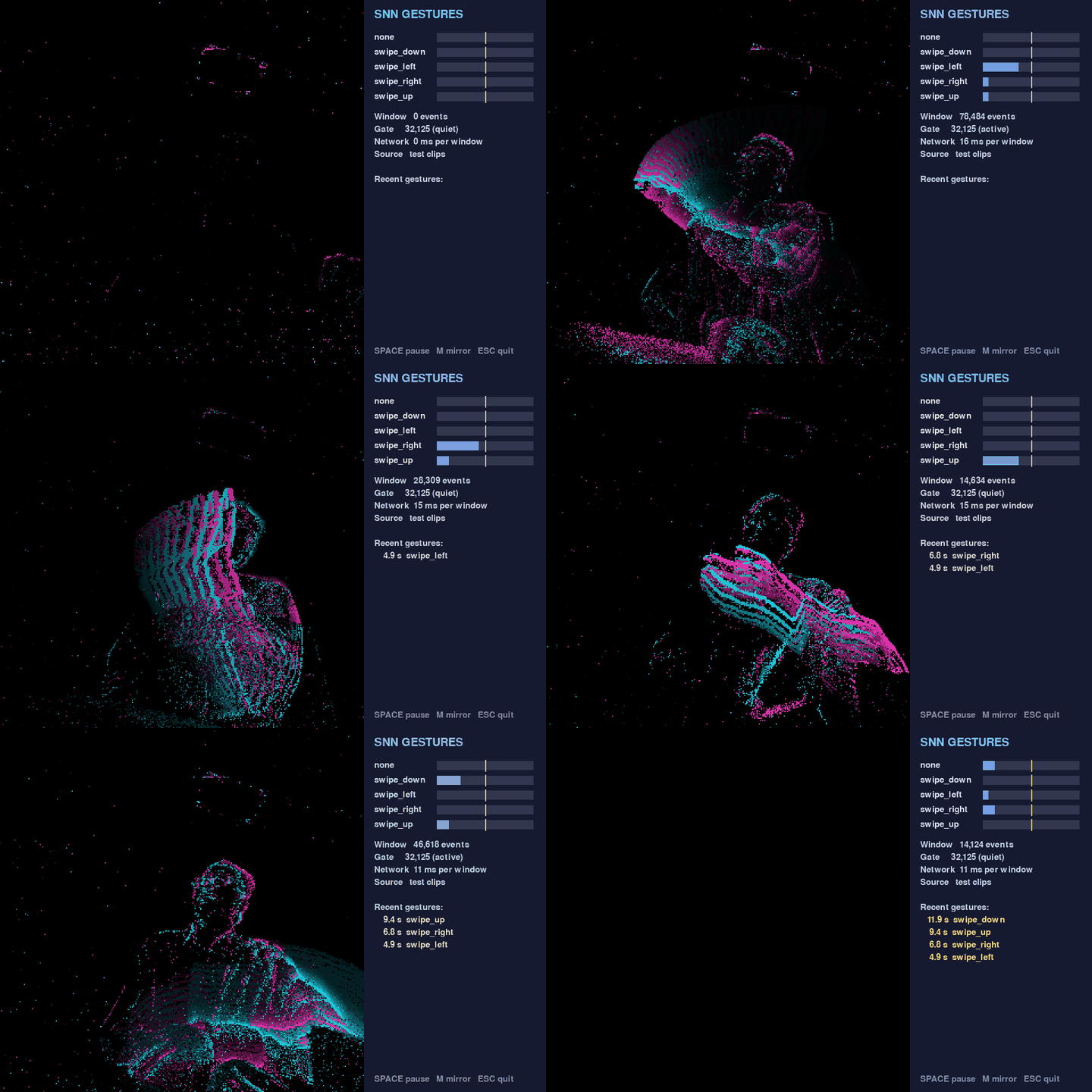
Replaying held-out test clips: a still (none) clip and one swipe of each direction, all detected correctly. Cyan = ON events, magenta = OFF; the panel shows each output neuron's firing rate (yellow line = threshold).
From Events to Spikes / イベントからスパイクへ

One swipe_left clip cut into 16 time steps of 94 ms. Row 1: events (cyan ON, magenta OFF). Row 2: input spikes the network receives (white = 1). Row 3: spikes of the 5 output neurons; swipe_left fires in 13 of 16 steps and wins.
Gestures / ジェスチャー
swipe_left |
swipe_right |
swipe_up |
swipe_down |
none |
|---|---|---|---|---|
 |
 |
 |
 |
 |
Example Results / 結果例
One person, one session, 100 clips (70 / 15 / 15 split), 150 epochs, T = 16:
| Check | Spike input | Sum-of-spikes input |
|---|---|---|
| Best valid accuracy | 100 % | 100 % |
| Test accuracy | 14 / 15 | 15 / 15 |
| Test-clip replay | 11 / 12 gestures, 0 false alarms | 12 / 12, 0 false alarms |
Run the Demo / デモの実行
git clone https://github.com/EventSensorCourse/gesture_recognition_genx320_spike-event.git
cd gesture_recognition_genx320_spike-event
python3.12 -m venv .venv && source .venv/bin/activate
python -m pip install -r requirements.txt
python detect_spikes.py --model pretrained/spike_csnn.pt --clips test  # replay, no board needed
python detect_spikes.py --model pretrained/spike_csnn.pt               # live camera
Disconnect OpenMV IDE first and keep the USB data cable plugged in; the program uploads the camera script automatically.